
Bank reconciliation software UK SMEs reconcile in minutes.
SwiftBooks Pro is online bank reconciliation software for UK SMEs: import bank CSV statements in Banking → Smart Bank Import, then categorise and reconcile, auto-match against invoices and bills, set rules for recurring items, and reconcile multi-currency accounts — feeding straight into your digital records.

What is bank reconciliation software?
Bank reconciliation software(sometimes called bank rec software) is a tool that imports transactions from your business bank account, matches them against the corresponding invoices, bills and expenses in your accounting records, and flags anything that does not match — replacing the manual job of tying paper statements to a ledger line by line.
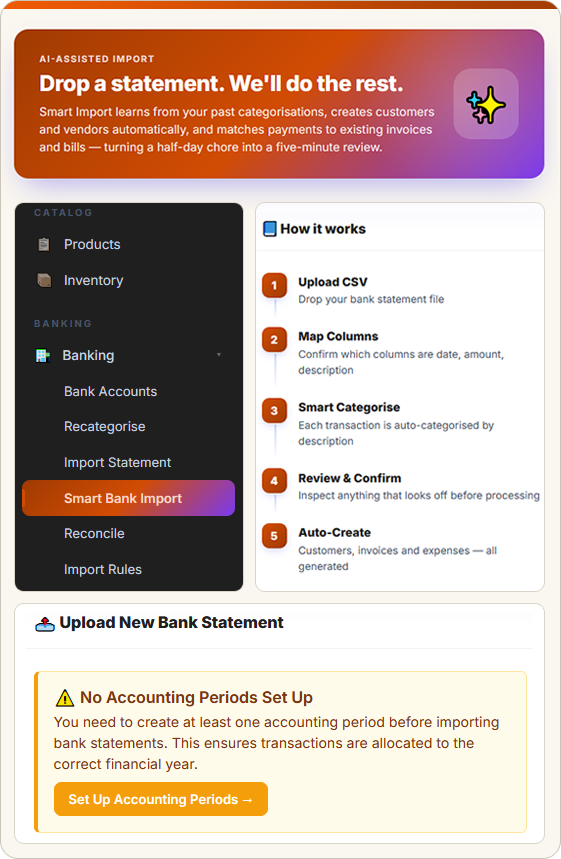
Modern bank reconciliation software UK in this login starts with a CSV export from your bank, Smart Bank Import to map and categorise, suggested matches against invoices and bills, Import Rules on Business+, and Reconcile when the period is done.
SwiftBooks Pro is bank reconciliation software UK SMEs use across the country — from London limited companies and Manchester agencies to Bristol consultancies and Edinburgh studios. Every paid plan includes CSV import, match and reconcile. Import Rules and extra banks sit on higher plans. Invite your accountant on Business+.
From CSV import to reconciled in four steps.
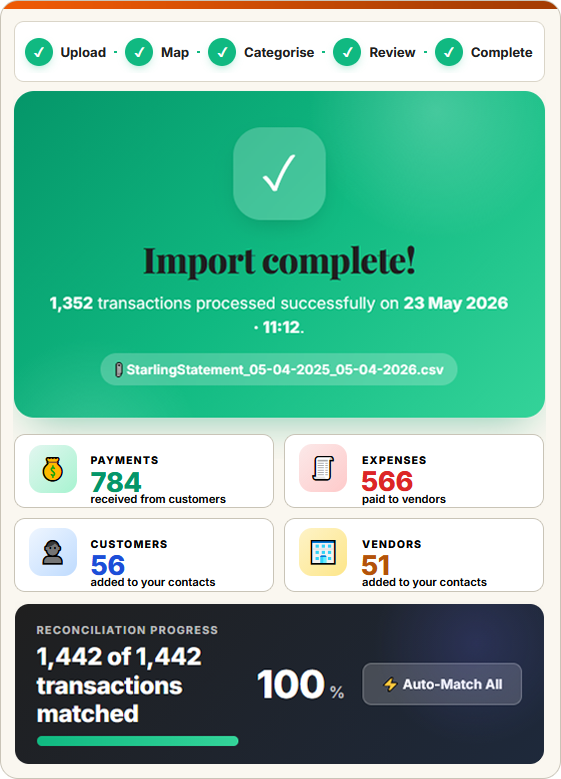
SwiftBooks Pro pulls every bank transaction, suggests the right match, applies bank rules and gives you a clean reconciled period at month-end. Each step links to the next, so your MTD digital records reflect reality at every stage.
CSV import built for UK SMEs.
Whether you bank with Barclays in London, Starling on a sole trader account in Cardiff, or run multi-currency accounts with Wise and Revolut Business, these tools keep your books reconciled to the penny.
CSV import from any UK bank
Export from Barclays, HSBC, Lloyds, NatWest, Santander, Starling, Monzo, Tide, Revolut Business or any UK bank that offers CSV. Upload when you are ready.
Learn more → ★ Auto-matchSmart auto-match for invoices & bills
SwiftBooks Pro learns from your reconciliation history and suggests matches against invoices, bills, transfers and refunds — with a confidence score. One click accepts.
Learn more → ★ RulesBank rules for recurring transactions
Set rules so Stripe payouts always code to Sales Receipts, Heroku charges to Hosting, payroll runs to Wages. Rules apply when you import the next CSV — full audit trail. Business+.
Learn more → ★ Multi-bankMulti-bank & multi-currency accounts
Run as many GBP, EUR, USD or other currency business accounts as you need. SwiftBooks Pro tracks FX gains and losses automatically on every reconciled line.
Learn more → ★ SplitsSplit transactions across categories
One Tesco charge for office stationery and staff snacks? Split it across nominal accounts with the right VAT per line. Full audit trail kept against the original bank line.
Learn more → ★ ReportsReconciliation reports & audit trail
Full reconciliation reports at any cutoff date, with unreconciled item lists, unmatched balances and reviewer signatures. Perfect for year-end and advisor review.
Learn more →Bank reconciliation that learns from you.
SwiftBooks Pro is not just a transaction list — it is bank reconciliation software with proper auto-match. The more you reconcile, the better the suggestions: customer payments to invoices, supplier payments to bills, transfers between accounts, refunds, fees. Every match comes with a confidence score, every rule applied is logged.
- ✓ Confidence-scored match suggestions
- ✓ Match by amount, reference or counterparty
- ✓ Handle Stripe, PayPal & GoCardless payouts
- ✓ Match part-payments & over-payments
- ✓ Bulk find & recode mistakes
- ✓ Transfer detection between accounts
- ✓ Discuss unmatched items with your team
- ✓ Period locking after reconciliation
- ✓ Advisor access for accountants
Banking, invoicing, bills & reporting — joined up.
Banking sits at the centre of every accounting workflow. SwiftBooks Pro links banking, invoicing, bills and reporting into one continuous trail: every paid invoice can be matched when you import the CSV that contains the payment, every approved bill is paid in Purchases → Payments Made (you record the payment; this login does not send a Bacs file), and every reconciled line feeds your cash flow reports and digital records.
Bank reconciliation software UK — honest competitor view.
Benchmarked against leading UK cloud accounting brands. Bank feed quality varies across entry tiers — treat pricing as indicative and confirm on each vendor's site.
| Feature | SwiftBooks Pro | Xero | QuickBooks | Sage |
|---|---|---|---|---|
| Free plan for sole traders | £15 Solo ex VAT after trial | ✗ | ✗ | Basic only |
| Starting price (per month) | £15 Solo ex VAT | £16 Ignite | £15 Simple Start | £15 Start |
| CSV statement import (any UK bank) | ✓ Smart Bank Import | ✓ | ✓ | ✓ |
| Auto-match suggestions | ✓ All paid plans | ✓ | ✓ | ✓ |
| Bank rules for recurring items | ✓ Business+ | ✓ | ✓ | ✓ |
| Split single transactions | ✓ | ✓ | ✓ | ✓ |
| Multi-currency bank accounts | ✓ Business+ | Premium only | Premium only | Paid plans |
| FX gain/loss calc auto | ✓ | Premium only | Premium only | Paid plans |
| Open Banking supplier payouts | ✗ Record Payments Made | Premium only | Premium only | Paid plans |
| Statement import (CSV) | ✓ | ✓ | ✓ | ✓ |
| Reconciliation reports | ✓ | ✓ | ✓ | ✓ |
Prices correct as of May 2026, excluding VAT. Bank feed support varies by bank and tier — Xero and QuickBooks reserve multi-currency reconciliation for higher tiers. SwiftBooks Pro imports statements by CSV on every paid plan. Feature availability subject to change. See our full comparison →
What Banking actually does.
Export CSV from your bank, upload in Smart Bank Import, categorise, match, Reconcile. That is banking in this login.
Import Rules remember repeating descriptions on Business and above. Solo still imports CSV and reconciles.
There is no Bacs file and no Open Banking payout. Record Payments Made, then match the bank line.
Bank reconciliation software UK — FAQs for SMEs.
Direct answers on CSV import, matching, Import Rules and what this login does not do.
What is bank reconciliation software?
Bank reconciliation software(sometimes called bank rec software) is a tool that imports transactions from your business bank account, matches them against the corresponding invoices, bills and expenses in your accounting records, and flags anything that does not match. SwiftBooks Pro is online bank reconciliation software for UK SMEs and sole traders, with Smart Bank Import from CSV statements (any UK bank) and digital records.
Does SwiftBooks Pro support Open Banking feeds?
Not a live feed. Export a CSV from any UK bank (Barclays, HSBC, Starling, Monzo and the rest), then upload it in Banking → Smart Bank Import. Map columns, categorise, match invoices, then Reconcile. Import Rules on Business+ remember repeating descriptions.
Does SwiftBooks Pro auto-match bank transactions?
Yes. SwiftBooks Pro learns from your previous reconciliations and suggests matches automatically — for invoices paid by customers, supplier bills you have paid, recurring subscriptions, and bank transfers. One click accepts the match. Confidence-scored suggestions keep accuracy high while saving hours each week.
Can I set bank rules in SwiftBooks Pro?
Yes. Create rules that recognise recurring transactions by description, amount or counterparty — for example, every Stripe payout goes to Sales Receipts, every Heroku charge goes to Hosting. Rules apply automatically when you import the next CSV, with full audit trail. Business+.
Does SwiftBooks Pro support multi-currency bank accounts?
Yes. Connect GBP, EUR, USD and any major-currency business bank account. SwiftBooks Pro tracks FX gains and losses automatically as transactions reconcile against invoices and bills in other currencies. Useful for UK SMEs trading across the EU and US.
Can I split a single bank transaction across multiple categories?
Yes. When a single bank payment covers multiple expenses (for example, a Tesco shop that includes office stationery and staff snacks), split it across as many nominal accounts as you need. VAT can be calculated correctly per split, and the full split is logged in your audit trail.
Does bank reconciliation support Making Tax Digital (MTD)?
Reconciled lines stay in the ledger.
How does SwiftBooks Pro compare to Xero or QuickBooks for bank reconciliation?
Xero and QuickBooks both offer bank feeds and reconciliation on paid plans. SwiftBooks Pro’s live path is CSV Smart Bank Import, categorise, match, then Reconcile — on every paid plan from £15/month ex VAT. Import Rules are on Business and above.
Bank reconciliation software UK SMEs reconcile in minutes.
Join UK SMEs using SwiftBooks Pro to import CSV statements, match invoices and reconcile. 30-day trial, then Solo at £15/month ex VAT.