
Purchase order software UK SMEs control spend with.
SwiftBooks Pro is online purchase order software for UK SMEs: raise branded POs, send the PDF, then convert to a supplier bill in one click. The PO locks. There is no GRN or three-way match screen — check the draft bill against the delivery yourself.
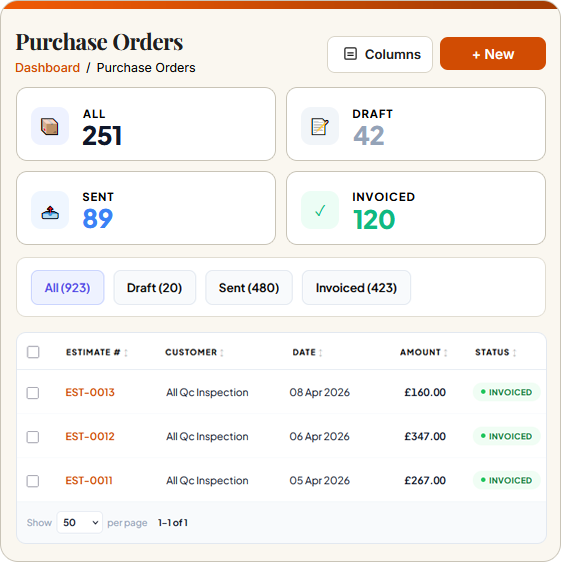
What is purchase order software?
Purchase order software(also called PO software or procurement software) is a tool that helps businesses raise, approve, send and track purchase orders to suppliers. A purchase order is a formal document committing to buy specific goods or services at agreed prices, sent before any money changes hands — it is the cornerstone of spend control in any UK SME or limited company.
Good purchase order software UK lets you commit in writing before the bill arrives. Convert to bill so you do not retype. Edit the draft if quantities differed. Pay in Payments Made. Stock on tracked items moves when the bill posts, not when the PO is saved.
SwiftBooks Pro is purchase order software UK SMEs use to keep procurement disciplined — from Bristol agencies and Manchester wholesalers to Edinburgh studios and London limited companies. Purchase orders are on Business and above, including convert-to-bill and branded PDFs. Multi-currency POs sit on the same gate. Invite your accountant as a user.
From PO to linked supplier bill.
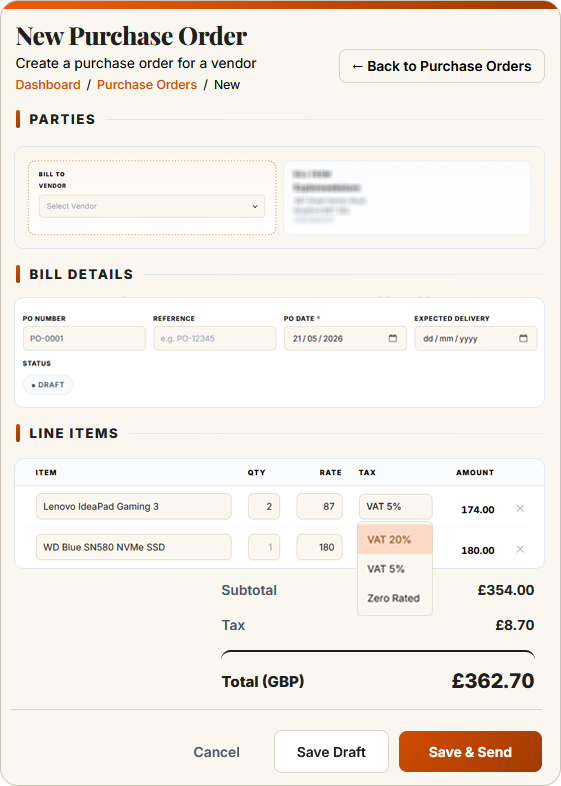
SwiftBooks Pro carries the supplier, line items and VAT from PO to bill. Send the PDF, convert when the invoice arrives, post the bill, record Payments Made.
Procurement control built for UK SMEs.
Whether you are a limited company in London or a sole trader in Cardiff, these tools turn a supplier commitment into a bill without retyping.
Branded purchase order PDFs
Send PO PDFs with your logo, terms and contact details. Suppliers know it is an authorised order, and your audit trail starts the moment the email lands in their inbox.
Learn more → ★ DraftDraft POs, extra users
There is no approval-limit matrix. Leave the PO in draft. Extra users on Business+ can open it before you send. That is the control that ships.
Learn more → ★ MatchingPO to bill — you check the delivery
When the supplier bill arrives, convert the PO. Lines copy across. There is no GRN. If quantity or price differed, edit the draft bill before you post.
Learn more → ★ DeliveryNo GRN screen
There is no goods-received note. When the delivery arrives, convert the PO to a bill and edit quantities if they differed. Then post.
Learn more → ★ ConvertOne-click PO to supplier bill
Click Convert to Bill. Vendor, line items, VAT and totals copy onto a draft bill. The PO then locks. Edit the draft if the delivery differed.
Learn more → ★ GlobalMulti-currency purchase orders
Raise POs in foreign currencies on Business+. Order from EU, US or Asian suppliers in EUR, USD or another enabled currency — then convert to a supplier bill and match payment after bank CSV import.
Learn more →Commit in writing, then convert — no retyping.
SwiftBooks Pro is a branded PO, not an approval matrix. Raise the order, send the PDF, convert to a supplier bill. Check the draft against the delivery yourself. POs are on Business and above.
- ✓ Sequential PO numbering
- ✓ Line-by-line VAT
- ✓ Branded PO PDF
- ✓ Expected delivery date
- ✓ Convert to bill in one click
- ✓ PO locks after convert
- ✓ Edit the draft bill if goods differed
- ✓ Stock on bill post, not PO save
- ✓ Business and above
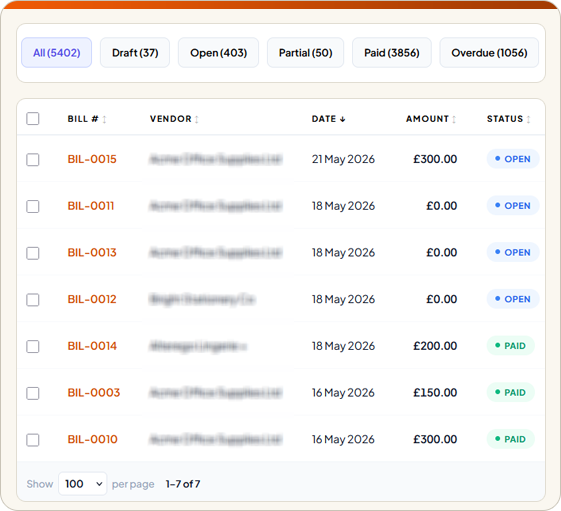
Purchase orders, bills & banking — joined up.
POs are the first step in procure-to-pay. SwiftBooks Pro links purchase orders, bills, banking and inventory into one continuous trail: every PO can convert to a supplier bill, every posted bill can be settled in Payments Made, every payment matches after CSV import, and tracked stock updates when the bill posts.
Purchase order software UK — honest competitor view.
Benchmarked against leading UK cloud accounting brands. PO functionality is uneven across entry tiers — treat pricing as indicative and confirm on each vendor's site.
| Feature | SwiftBooks Pro | Xero | QuickBooks | Sage |
|---|---|---|---|---|
| Free plan for sole traders | £15 Solo ex VAT after trial | ✗ | ✗ | Basic only |
| Starting price (per month) | £15 Solo ex VAT | £16 Ignite | £15 Simple Start | £15 Start |
| Native purchase orders | ✓ Business+ | ✓ All paid plans | Essentials & up | Paid plans |
| Multi-stage spend approvals | ✗ Draft then send | Premium only | Premium only | Paid plans |
| Three-way matching (PO ↔ Bill ↔ GRN) | ✗ Convert + edit bill | Limited | Premium only | Paid plans |
| Goods received tracking | ✗ No GRN | Limited | Premium only | Paid plans |
| Branded PO PDFs | ✓ All plans | ✓ | ✓ | ✓ |
| One-click PO → supplier bill | ✓ | ✓ | ✓ | ✓ |
| VAT-aware line totals on POs | ✓ | ✓ | ✓ | ✓ |
| Multi-currency POs | ✓ Business+ | Premium only | Premium only | Paid plans |
| PO limit on entry plan | Unlimited | Unlimited | n/a | Unlimited |
Prices correct as of May 2026, excluding VAT. SwiftBooks Pro POs convert to a bill; there is no GRN or three-way matcher. POs are Business and above. Feature availability subject to change. See our full comparison →
What Purchases → Purchase Orders actually does.
Raise a branded PO, email the PDF, convert to bill when the supplier invoices. The PO locks. That is the control that ships — not a GRN.
No three-way matcher. If the delivery differed, edit the draft bill before you post. Stock on tracked items moves when the bill posts, not when the PO is saved.
POs are on Business and above — not Solo. Multi-currency POs sit on the same gate. Extra users so someone else can check the draft.
Purchase order software UK — FAQs for SMEs.
Direct answers on POs, convert-to-bill, and what this login does not do.
What is purchase order software?
A PO is a commitment you send a supplier before the bill arrives. In SwiftBooks Pro: Purchases → Purchase Orders, then convert to bill when the invoice arrives. POs are on Business and above.
What is the difference between a purchase order and a bill?
A purchase order is what you send. A bill is what they send back. Convert PO to bill so lines copy. Saving a PO does not add stock — posting the bill does.
Is there three-way matching?
Not as an automated PO + GRN + bill matcher. Convert PO to bill, then edit the draft if goods differed. There is no GRN screen.
Can I set multi-stage spend approvals?
No approval-limit engine. Use draft POs and extra users on Business+ so someone else checks the draft bill.
Can I convert an approved PO into a supplier bill?
Yes. Convert to bill. The PO then locks. Edit the draft if needed, then post.
Does saving a PO add stock?
No. Tracked stock increases when the bill posts.
Does this file VAT?
VAT on the later bill stays in the ledger.
Which plan includes purchase orders?
Business and above — not Solo. After a 30-day trial, Solo is £15/month ex VAT; Business is £39/month ex VAT.
Purchase order software UK SMEs control spend with.
Raise branded POs on Business and above, convert to a bill, lock the PO. 30-day trial, then Solo at £15/month ex VAT.