
Bill management software UK SMEs pay smarter with.
SwiftBooks Pro is online bill management software for UK SMEs: key supplier bills in Purchases → Bills, convert from a purchase order, enter VAT, then record Payments Made and match the bank CSV. There is no inbox OCR or Bacs pay-run in this login.

What is bill management software?
Bill management software(also called accounts payable software or AP automation) is a tool that records supplier invoices, VAT and what you still owe. In this login that is Purchases → Bills — keyed or converted from a PO — then Payments Made and CSV match.
Modern bill management software UK in this login is keyed bills plus convert-from-PO. Recurring bills cover known subscriptions. You inspect the draft, post, then pay from your bank. The audit trail is the bill and the payment.
SwiftBooks Pro is bill management software UK SMEs use across the country — from London limited companies and Manchester agencies to Bristol consultancies and Edinburgh studios. Paid plans include bills, recurring bills and Payments Made. Extra users for a second pair of eyes are Business+. Invite your accountant there too.
From supplier bill to paid & matched.
SwiftBooks Pro carries the supplier, line items and VAT from draft bill to posted bill. Pay outside the app. Record Payments Made. Match the CSV.
Supplier bills in the same ledger as sales.
Whether you are a limited company in London or a sole trader in Cardiff, these tools turn supplier paperwork into posted bills and payments — without OCR or a pay-run rail.
Key the bill — or convert from a PO
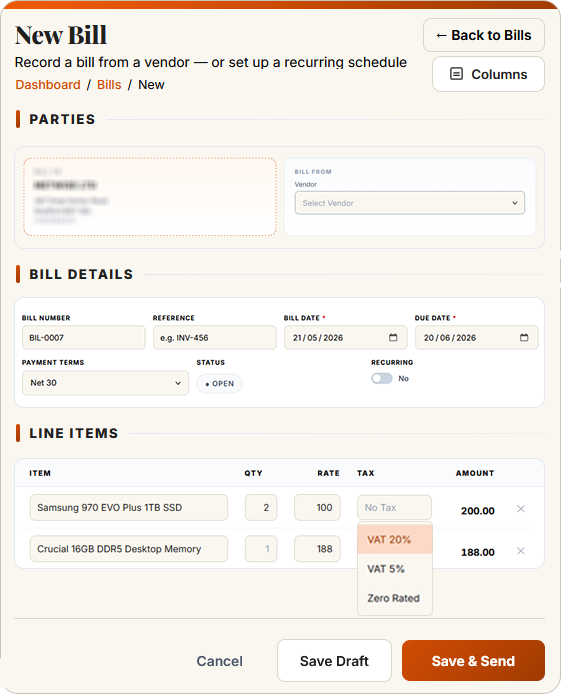
There is no inbox OCR. Create the bill, or convert the purchase order so lines copy across. Edit the draft if the delivery differed, then post.
Learn more → ★ DraftDraft, then post
There is no threshold routing engine. Keep the bill in draft until someone has checked it. Extra users on Business+ give you a second pair of eyes.
Learn more → ★ VATVAT on the bill line
Choose 20%, 5%, zero, exempt or reverse charge on each line. That stays in the ledger.
Learn more → ★ RecurringRecurring bills & subscriptions
Schedule the bills you know are coming — rent, hosting, software subscriptions. Each cycle creates a fresh draft. Review it, then post.
Learn more → ★ PaymentsRecord Payments Made
Pay the supplier from your bank. Then Purchases → Payments Made. Match the outbound line after CSV Smart Bank Import. No Bacs file, no Open Banking payout.
Learn more → ★ ReportingAged creditors & supplier statements
See exactly what you owe and when. Aged creditor reports break down 30/60/90 day balances by supplier, and supplier statements reconcile against your purchase ledger in one click.
Learn more →Bills you key, check, and pay from your bank.
SwiftBooks Pro is not an OCR inbox. It is bill management software that lives next to invoices: create the bill, convert from a PO, post it, record the payment. Extra users on Business+ if someone else should look before you post.
- ✓ Keyed bills in Purchases → Bills
- ✓ Convert purchase order to bill
- ✓ Recurring bills for known costs
- ✓ VAT on each line
- ✓ Draft until you are ready to post
- ✓ Extra users on Business+
- ✓ Payments Made after you settle
- ✓ CSV match in Smart Bank Import
- ✓ Aged creditors in Insights → Reports
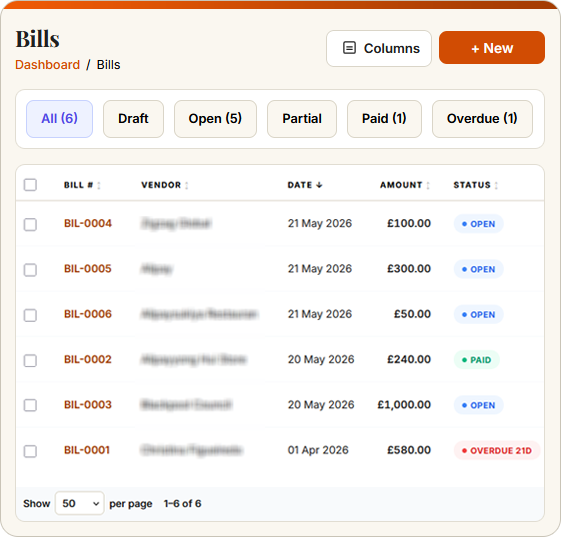
Purchase orders, bills & banking — joined up.
Bills are one part of accounts payable. SwiftBooks Pro links purchase orders, bills, banking and reporting into one continuous trail: every PO can convert to a bill, every posted bill can be settled in Payments Made, every payment matches after CSV import.
Bill management software UK — honest competitor view.
Benchmarked against leading UK cloud accounting brands. SwiftBooks Pro bills are keyed or converted from a PO — not OCR or a Bacs rail. Treat competitor pricing as indicative.
| Feature | SwiftBooks Pro | Xero | QuickBooks | Sage |
|---|---|---|---|---|
| Free plan for sole traders | £15 Solo ex VAT after trial | ✗ | ✗ | Basic only |
| Starting price (per month) | £15 Solo ex VAT | £16 Ignite | £15 Simple Start | £15 Start |
| Bill capture & supplier ledger | ✓ All paid plans | Paid plans | Paid plans | Paid plans |
| Convert purchase order to bill | ✓ Business+ | ✓ | Paid plans | Paid plans |
| Multi-stage approval workflows | ✗ Draft then post | Premium only | Premium only | Paid plans |
| Recurring bills | ✓ | ✓ | ✓ | ✓ |
| Pay runs & Bacs export | ✗ Payments Made | Premium only | Premium only | Paid plans |
| Open Banking supplier payments | ✗ Not in this login | Premium only | Premium only | Paid plans |
| VAT reverse charge handling | ✓ | ✓ | ✓ | ✓ |
| Multi-currency supplier bills | ✓ Business+ | Premium only | Premium only | Paid plans |
| Aged creditor reports | ✓ | ✓ | ✓ | ✓ |
Prices correct as of May 2026, excluding VAT. Xero notably requires Hubdoc (free with most subscriptions) plus higher tiers for full bill payment automation. SwiftBooks Pro does not include OCR or bill pay. Feature availability subject to change. See our full comparison →
What Purchases → Bills actually does.
Key the supplier bill, or convert from a purchase order so lines copy across. Inspect the draft, post it. That is capture in this login — not OCR.
Pay from your bank. Record Payments Made. Upload the CSV in Smart Bank Import and match the outbound line. No Bacs rail, no Open Banking payout.
Recurring bills cover known subscriptions. Extra users for a second pair of eyes are Business+. Invite your accountant there too.
Bill management software UK — FAQs for SMEs.
Direct answers on bills, PO convert and how you record payment.
What is bill management software?
It records supplier invoices (bills), VAT, and what you still owe. In SwiftBooks Pro that is Purchases → Bills, Recurring Bills, and Payments Made.
What is the difference between a purchase order, a bill, and an invoice?
A purchase order is what you send a supplier before they invoice you. A bill is their invoice to you. An invoice is what you send your customers. Convert PO → bill so you do not retype. There is no goods-received note or three-way matcher.
Does SwiftBooks Pro capture bills using OCR?
No. Key the bill or convert from a purchase order so lines copy across. There is no email inbox OCR or camera capture in this login.
Can I convert a purchase order into a bill?
Yes. Open the PO and convert to bill. The PO then locks. Edit the draft if the delivery differed, then post. Tracked stock increases when the bill posts.
Can I set up approval workflows for bills?
No multi-stage approval engine. Save as draft, then post. Extra users on Business+ so someone else can check the draft. That is the control that ships.
How does SwiftBooks Pro handle VAT on supplier bills?
You choose the VAT rate on each bill line. That is the ledger record.
Can I schedule supplier payments through SwiftBooks Pro?
No Bacs file or Open Banking pay-run. Pay from your bank, then record Purchases → Payments Made. Match the outbound line after CSV import.
Does this file VAT?
VAT on bills stays in the ledger. There is no free-forever plan. After a 30-day trial, Solo is £15/month ex VAT.
Bill management software UK SMEs pay smarter with.
Key supplier bills or convert from a PO, then record Payments Made. 30-day trial, then Solo at £15/month ex VAT.