
Expense tracking software UK SMEs claim back faster with.
SwiftBooks Pro is online expense tracking software for UK SMEs and sole traders: log costs in Purchases → Expenses with lines and VAT, use Recurring Expenses for known amounts, and match the bank CSV later. No camera OCR, no GPS mileage, no Bacs file.

What is expense tracking software?
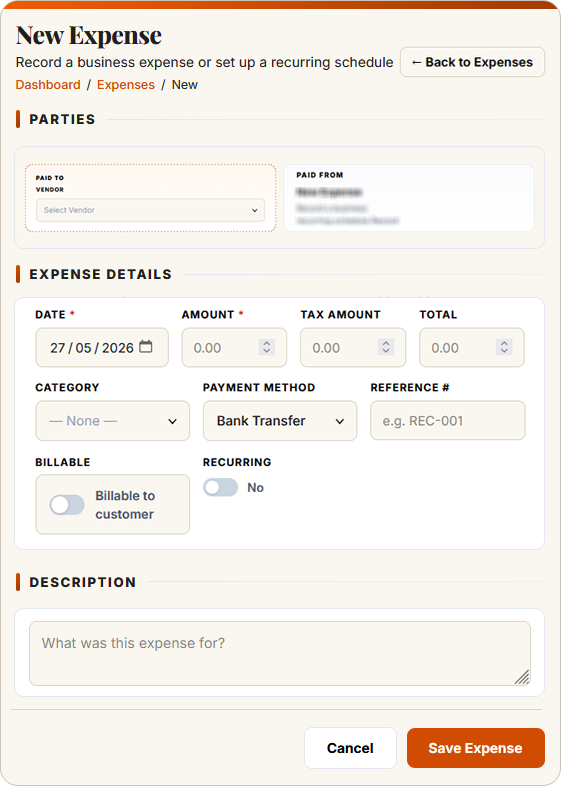
Expense tracking software(also called expense management software) is a tool that records business costs in the same ledger as invoices. In this login: Purchases → Expenses. Key the amount and VAT. Reimburse from your bank. Match CSV.
Modern expense tracking software UK in this login is the expense form: supplier, amount, category, VAT. Use the browser on your phone. Reimburse from your bank. Match CSV. Time and jobs live under Projects / Timesheet, billed via invoice.
SwiftBooks Pro is expense tracking software UK SMEs and sole traders use across the country — from London consultants and Manchester field engineers to Bristol agencies and Edinburgh photographers. Every paid plan includes expenses and recurring expenses. Extra users are Business+.
From keyed expense to matched bank line.
Create the expense, enter VAT, post it. Pay or reimburse from your bank. Match the CSV.
Expenses in the same ledger as invoices.
Whether you are a sole trader in Cardiff or a limited company with a small team, these tools record costs without a camera scanner or a Bacs file.
Log the expense in the browser
Open Purchases → Expenses. Enter supplier, amount, category and VAT. Use your phone browser on site — there is no App Store scanner.
Learn more → ★ MileageMileage as a keyed expense
Create an expense for miles × the HMRC rate you are entitled to apply. There is no GPS tracker or rate engine. Keep your own log if you need one.
Learn more → ★ UsersUsers, not an approval engine
Solo includes 2 users. Business+ is unlimited users, no per-seat fee. They key expenses in the browser. There is no multi-stage claim queue.
Learn more → ★ VATVAT on the expense line
You enter the VAT on the expense line. That is the record.
Learn more → ★ ProjectsTime and jobs under Projects
Billable hours live in Time Tracking → Timesheet. Invoice unbilled time from the project. Expenses are a separate purchase document — not an OCR-tagged receipt that auto-rolls onto an invoice.
Learn more → ★ BankReimburse from your bank
Pay the person from your bank. Then match the CSV line in Smart Bank Import. There is no Bacs file or Open Banking payout in this login.
Learn more →Expenses you key — even on your phone.
SwiftBooks Pro is the expense form in Purchases. Use the browser on your phone. Native iOS/Android apps are not live. No camera OCR, no GPS, no Bacs file.
- ✓ Keyed expenses in Purchases → Expenses
- ✓ Recurring expenses
- ✓ VAT rate on the line
- ✓ Mileage as a keyed amount
- ✓ CSV match after you pay
- ✓ 2 users on Solo, unlimited on Business+
- ✓ Browser on your phone — no native app
- ✓ Invite your accountant as a user
Expenses, projects, invoicing & reporting — joined up.
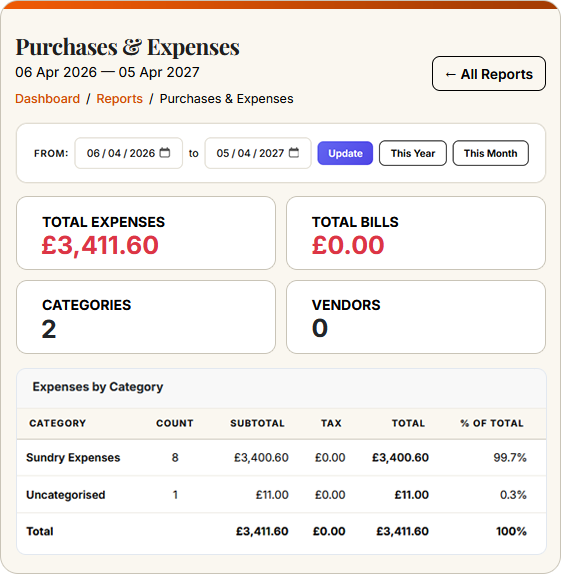
Expenses do not live in isolation. SwiftBooks Pro links expenses, projects, invoicing and reporting into one continuous trail: every expense posts VAT to the ledger, time bills via Projects / invoices, and every payment matches after CSV import.
Expense tracking software UK — honest competitor view.
Benchmarked against leading UK cloud accounting brands. Expense modules vary widely — Xero, QuickBooks and Sage charge add-ons or higher-tier pricing for full expense workflows. Treat pricing as indicative and confirm on each vendor's site.
| Feature | SwiftBooks Pro | Xero | QuickBooks | Sage |
|---|---|---|---|---|
| Free plan for sole traders | £15 Solo ex VAT after trial | ✗ | ✗ | Basic only |
| Starting price (per month) | £15 Solo ex VAT | £16 Ignite | £15 Simple Start | £15 Start |
| Mobile receipt scan with OCR | ✗ Key in the browser | Xero Expenses add-on | ✓ | AutoEntry add-on |
| HMRC mileage rates with GPS | ✗ You apply the rate | Xero Expenses add-on | Mileage add-on | Limited |
| Approval workflows | ✗ Draft then post | Xero Expenses add-on | Plus & Advanced | Paid plans |
| Per-diem & subsistence rules | ✗ Key the amount | Workaround only | Premium only | Paid plans |
| Project / billable tagging | ✗ Time via Projects | Projects add-on | Plus & Advanced | Paid plans |
| Multi-currency expenses | ✓ Business+ | Premium only | Premium only | Paid plans |
| VAT auto-extraction | ✗ You enter VAT | ✓ | ✓ | ✓ |
| Bacs / Open Banking reimbursement | ✗ Pay then match CSV | Premium only | Premium only | Paid plans |
| Credit card statement import | ✓ CSV Smart Import | ✓ | ✓ | ✓ |
Prices correct as of May 2026, excluding VAT. Xero Expenses is a paid add-on charging per active user per month on top of any Xero plan. QuickBooks Online bundles basic receipt capture but reserves approval workflows for Plus and Advanced. Sage Accounting typically integrates with AutoEntry for OCR. SwiftBooks Pro includes keyed expenses on every paid plan. Extra users are Business+. No OCR, GPS or Bacs file. Feature availability subject to change. See our full comparison →
What Purchases → Expenses actually does.
Open Expenses, enter supplier, amount, category and VAT. Recurring expenses cover known costs. That is capture in this login — not a camera scanner.
Mileage is an expense you key at the HMRC rate you apply. There is no GPS tracker. Keep your own log if you need one for HMRC.
Reimburse from your bank. Match the CSV. VAT on the line stays in the ledger; Extra users are Business+.
Expense tracking software UK — FAQs for SMEs.
Direct answers on expenses, mileage and what this login does not do.
What is expense tracking software?
It records business costs in the same ledger as invoices. In SwiftBooks Pro: Purchases → Expenses and Recurring Expenses.
Can I scan receipts using my phone in SwiftBooks Pro?
Not with OCR. Use the browser on your phone to key the expense. Native iOS/Android apps are not live.
Does SwiftBooks Pro calculate HMRC mileage automatically?
No GPS or rate engine. Create an expense for the miles × the HMRC rate you are entitled to apply. Keep your own log if HMRC asks.
Does this reclaim VAT from HMRC?
It stores VAT on the expense line.
Will SwiftBooks Pro pay staff by Bacs?
No. You reimburse from your bank, then match the CSV line.
Can the team submit expenses?
Solo includes 2 users. Business and above have unlimited users, no per-seat fee. They key expenses in the browser. There is no approval-queue engine.
Is there a free forever expenses plan?
No. 30-day trial, no card. Then Solo at £15/month ex VAT.
How does this compare to Xero Expenses?
Xero Expenses is often a paid add-on. SwiftBooks Pro includes keyed expenses on every paid plan. It does not include camera OCR, GPS mileage or a Bacs reimbursement file.
Expense tracking software UK SMEs claim back faster with.
Log expenses in the browser. VAT stays in the ledger; 30-day trial, then Solo at £15/month ex VAT.